Salestrics Review - A Revenue Workspace That Puts Your CRM in Your AI Agents
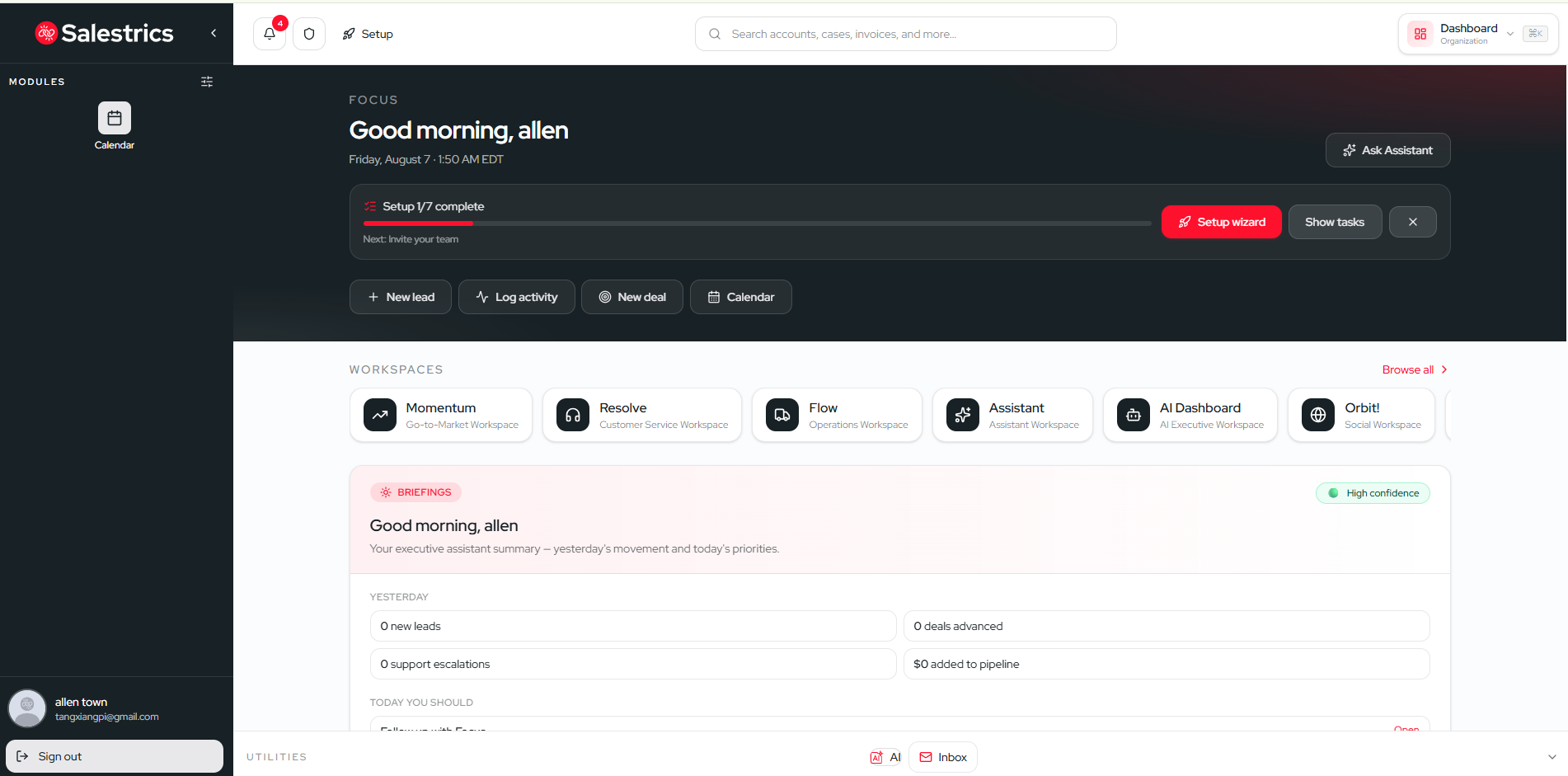
Let me start this Salestrics review with a confession. I have spent years jumping between a CRM, an email client, a proposal tool, a meeting app, and a help desk. Every sale touched at least four different tabs. And the moment I tried to hand my pipeline data to an AI assistant, the whole thing fell apart, because the data was always a CSV export from two weeks ago.
That is exactly the problem Salestrics set out to solve. It calls itself a revenue workspace, and in this Salestrics review I look at how it pulls CRM, email, documents, meetings, support, and AI into one place, then hands all of that live data to your AI agents through a managed MCP server. This is not another spreadsheet disguised as a CRM. It is an attempt to make your sales data genuinely usable by the AI tools you already run.
What Is Salestrics?
Salestrics is a revenue workspace for startups and small sales teams. Instead of forcing you to assemble a stack of point solutions, it combines the core pieces of a sales operation into a single platform:
- CRM and pipeline management for tracking leads, contacts, and deals
- Business email that keeps your inbox connected to account context
- Documents and spreadsheets for proposals that live next to the customer record
- Meetings and team collaboration so context is not scattered
- Invoicing and reporting tied back to the actual business records
- Customer support that keeps the full relationship history in view
- Context-aware AI built into the workspace and exposed to your own agents
The headline feature in this Salestrics review is the managed MCP server. MCP stands for Model Context Protocol, and it is the standard that lets AI clients like Cursor, Claude Desktop, VS Code, Windsurf, Cline, and ChatGPT talk to your data. Salestrics hosts this server for you, which means your AI agents can read and act on your current CRM data in real time, with no CSV exports involved.
Why a Revenue Workspace Instead of a Stack?
Most small teams end up with Salesforce for the pipeline, a separate email tool, Zoom for calls, a proposal app, and a help desk. The tools do not talk to each other. Every handoff between stages requires copy-pasting context. And if you want AI to help, you have to export data and hope it is fresh.
A revenue workspace collapses all of that into one system where the context is shared. When an email comes in, it is attached to the right account. When a meeting happens, it lands on the same record. When you write a proposal, the customer history is right there. This is the part of the Salestrics review that most impressed me, because it removes the friction that makes sales tools feel like chores.
One customer, Brad Davis of Next Level Lawn Care, said he replaced his Salesforce and Zoom subscriptions with a single Salestrics plan. Another, Dan Flemming of Flemming Automotive, noted that the workflows match how his team actually sells, with less configuration and more closed deals. That kind of feedback shows the product is designed around real sales motions, not around making a CRM look impressive.
The MCP Server Is the Real Story
If you have tried to make AI work with your business data, you know the pain. You export contacts, upload them to a tool, ask a question, and the answer is already outdated. Salestrics eliminates that problem with its hosted MCP server.
Here is what stood out in my testing:
- 153 MCP tools covering CRM, email, and operations, so agents can do more than read data
- Organization-level API keys so each workspace has its own access control
- Real-time data with no CSV exports, meaning agents read and act on the current workspace state
- Support for the major AI clients including Cursor, Claude Desktop, VS Code, Windsurf, Cline, and ChatGPT
The practical result is that you can ask Claude or Cursor to summarize a deal, draft a follow-up email, or flag accounts that have gone quiet, and the answer is based on your actual live pipeline. Tony Daniels of Igloo Creative described the AI assistant as one of the most accurate he has used because it works off real CRM data.
This is the direction a lot of sales tooling is heading, and in this Salestrics review it felt like the platform has genuinely embraced it rather than bolting on a chatbot.
Context-Aware AI Built Into the Workspace
Beyond the MCP server, Salestrics includes its own browser-based AI assistant. The value here is that it understands your pipeline and account activity in real time. You can ask it to summarize where a deal stands, prepare notes for an upcoming call, or surface the latest activity across an account, and it pulls from live data rather than a snapshot.
Because the AI sits inside the same workspace as your email, documents, meetings, and support history, it can connect dots that a standalone tool cannot. An account that just opened a proposal and sent a support ticket is clearly engaged, and the assistant can see both. This contextual layer is what separates a genuinely useful AI assistant from a generic chat widget.
The Full Customer View, From First Touch to Support
Most CRMs are built for the moment of the sale. They track the deal, then forget the customer. Salestrics keeps the full relationship in one place, including the support history through its Resolve customer service tool. Resolve keeps support conversations linked to the account, so the whole history stays in view instead of living in a separate help desk.
That matters more than it sounds. When support and sales share the same record, your team knows whether a customer is expanding, renewing, or struggling before they ever pick up the phone. The full picture is visible to everyone, which reduces the number of awkward "let me check with the other team" moments.
Who Should Use Salestrics?
Based on this Salestrics review, the platform fits a few types of teams well:
- Startups that want one tool instead of five subscriptions and want to keep costs predictable
- Founders and operators who wear many hats and need context to live in one place
- Small sales teams that want AI to genuinely help with live pipeline data rather than stale exports
- AI-forward organizations that already use Cursor, Claude, or other agents and want them connected to real business data
If you are a large enterprise with deeply entrenched Salesforce customizations, this is probably not your tool. But if you are tired of assembling and paying for a fragmented stack, it is worth a serious look.
Salestrics Alternatives
If you are comparing options, here is how Salestrics positions itself against the status quo:
| Need | Traditional Stack | Salestrics Revenue Workspace |
|---|---|---|
| Pipeline tracking | Separate CRM (Salesforce, HubSpot) | Built-in CRM and pipeline |
| AI access to data | CSV exports, stale snapshots | Live managed MCP server |
| Customer history | Fragmented across support, email, and sales | Single full relationship view |
| Tool cost | Multiple subscriptions | One subscription |
| Proposal workflow | Separate proposal app | Documents in the workspace |
The clearest differentiator is the live MCP connection. Most CRMs can export data; very few hand it to your AI agents in real time without extra setup.
Pricing and Getting Started
Salestrics uses a simple "one price, the whole revenue toolkit" approach. Every paid plan includes business email, so you are not paying per mailbox on top of everything else, and all paid plans come with a 30-day free trial that needs no credit card. If you pay annually, you get two months free, which works out to roughly a 17 percent saving.
Free Forever
The free plan is genuinely usable for getting started. At $0 with no credit card, it includes the core platform with sales pipeline, documents, an AI assistant, books, and reports, plus business email on a mysalestrics.com address. It covers one team member and up to 1,000 contacts and deals, with 1GB of file storage per person. If you grow, you can add extra members at $15 per person per month.
Paid Plans
The paid tiers scale by seat count, record limits, AI credits, and automation capacity. Here is a quick rundown of the monthly pricing:
| Plan | Monthly Price | Seats | Record Limit | Standout Features |
|---|---|---|---|---|
| Intro | $29.99 | 1 | 10,000 | Built for solo sellers, custom fields, 1M AI credits/month |
| Startup | $59.99 | 2 | 10,000 | Adds team chat and 1-on-1 video calls (up to 30 minutes) |
| Launch | $149.99 | 5 | 100,000 | Most popular, adds Orbit, group video, and custom email domain |
| Runway | $299.99 | 10 | Unlimited | For growing teams, 50GB storage per person, priority support |
| Scale | $549.99 | 25 | Unlimited | For high-volume teams, 100GB storage per person, early access |
The Launch plan is marked as the most popular. It is where you unlock the custom company email domain, Orbit for social and publishing, and group video for up to five people. For larger organizations, Salestrics also offers an Enterprise tier with custom pricing for teams over 100 people, including unlimited records, custom seat and AI packages, and early access to new AI models.
Annual billing works out nicely. Intro drops to about $24.99 per month, Startup to $49.99, and Launch to $124.99 when paid yearly. You can also add extra seats to any plan, including the free one, at $15 per person per month.
Given that customers report replacing multiple subscriptions with a single Salestrics plan, the value argument is about consolidation as much as it is about features. The pricing page compares this to a traditional stack of HubSpot, Salesforce, and similar tools that can run $400 to $1,200 per month. If you are currently paying for a CRM, an email tool, and a meeting app, the potential savings are obvious.
Customer Feedback
The customer voices on the Salestrics site are worth repeating in this review:
- Brad Davis of Next Level Lawn Care replaced Salesforce and Zoom subscriptions with Salestrics
- Dan Flemming of Flemming Automotive found the workflows match how his team actually sells, with less config and more closed deals
- Tony Daniels of Igloo Creative called the CRM-based AI assistant one of the most accurate he has used
These are practical, operational wins. They are not about fancy dashboards. They are about a workspace that fits the way a real team sells and lets AI actually help.
Product Roadmap and Recent Updates
Salestrics is moving quickly. In early August 2026, it deployed MCP integration to support agentic B2B revenue workflows, and around the same time it announced new executive leadership focused on global expansion. That level of activity suggests the product is investing heavily in the AI-agent direction, which aligns with the core promise of this review.
What I Liked and What I Would Watch
What stood out:
- Live MCP server means AI agents work on current data, not exports
- One workspace for email, documents, meetings, support, and CRM
- Full customer history across the entire relationship lifecycle
- Real cost consolidation for teams on multiple subscriptions
- AI assistant grounded in your actual pipeline activity
Things to consider:
- Enterprise pricing is custom, so large teams will need to book a call
- Best fit is startups and small teams rather than large enterprises
- Some advanced integrations and API details are not fully spelled out on the homepage, so you may need to dig into the docs
Frequently Asked Questions
These are some of the common questions teams have when they evaluate Salestrics.
Is Salestrics really free to start?
Yes. The Free Forever plan gives one person the core revenue workspace at no cost and with no credit card. You get the pipeline, documents, the AI assistant, ledger, and reports, plus Resolve in beta and Salestrics Mail. Salestrics AI comes with 50,000 tokens per month on the free plan. When you need team chat, video, Orbit, or more seats, you can upgrade to a paid plan any time.
Can I try Salestrics AI before signing up?
You can. Visit ai.salestrics.com to chat with Salestrics AI using 30,000 free demo tokens, with no sign-in required. Inside the workspace, AI shows up in the Assistant, in embedded panels on home pages, and in the Workspace and Mail editors. It is included on every plan, including Free Forever.
What is Salestrics Mail?
Salestrics Mail is the built-in email included on every plan. You get personal and organizational mailboxes at mysalestrics.com, and you can read and send mail from mail.salestrics.com. Mail storage counts against your per-user drive, with organization-wide files given twice the drive space per user. On the Launch, Runway, and Scale plans, you can bring your own company email domain.
Do I need Zoom or another video tool?
No. The Startup plan and above include video meetings right in the browser, with screen sharing, meeting chat, and invite links included. So you do not need a separate video subscription on top of everything else. The one limitation is that Startup and Launch are built for calls within your own organization, while Runway and Scale let you share invite links so customers, partners, or candidates can join a call.
Can I try a paid plan before committing?
Yes. There is a one-time 30-day free trial on the Intro through Scale plans, and it needs no credit card. You can start it from the pricing page or from Admin, then Billing. And if you would rather not, the Free Forever plan stays available, so you can take your time.
Can my whole team use Salestrics?
Yes. Paid plans include multiple seats, role-based access, and a dedicated URL for your organization in the form of yourcompany.salestrics.com. You add licenses as you grow, and the pricing page spells out exactly what each plan includes, from the two seats on Startup up to 25 on Scale and custom setups for Enterprise.
Conclusion
After spending time with the product and its documentation, my Salestrics review verdict is positive. The revenue workspace model genuinely reduces tool sprawl, and the managed MCP server is a forward-looking answer to the question of how AI should interact with business data. Instead of asking you to export and clean data for your agents, Salestrics hands them the live workspace directly.
For startups and small sales teams that want a single place to run the business and a way to make their AI tools genuinely useful, Salestrics is worth starting free. If you are tired of stitching together a half-dozen tools and hoping the data stays consistent, this is exactly the kind of product that removes that headache.
Ready to see your CRM data work with your AI agents? 👉 Start free with Salestrics today, no credit card required, and find out whether a revenue workspace beats your current stack.
Tags
# Review# Salestrics# Salestrics review# revenue workspace# CRM with AI# AI sales assistant# MCP server for CRM# AI agents CRM# Claude Desktop CRM integration# Cursor AI sales# sales CRM platform# AI sales automation# small business CRM# startup CRM# all-in-one sales tool# AI-powered CRM# sales pipeline management# context-aware AI# Model Context Protocol sales# AI email assistant# customer relationship management# sales workflow automationFollow for new blogs
Subscribe to our blog
Subscribe to Newsletter
Subscribe to our newsletter to get the best products weekly.